In today’s rapid and dynamic business environment, small-and-medium businesses (SMBs) have to be flexible and responsive to ever-changing issues in order to remain competitive. However, when it comes to IT infrastructure, SMBs often lack the budget and resources to implement IT solutions the way large corporations usually do. For SMBs it is even harder to manage remote access and security in a cost-effective way, especially when access to corporate resources is not limited to the same location, but includes mobile workers and partners in different locations. For these situations Billion's BiGuard SSL VPN Security Appliance series provide the perfect answer.
Great Mobility and Productivity
Billion’s BiGuard SSL VPN Security Appliance series integrate cutting-edge SSL VPN technology for small offices and SMBs to establish private encrypted tunnels, without VPN software pre-installation in client PCs, through the public Internet to securely access corporate resources from any location, such as a branch office, hotel, home, cyber café, or even a public kiosk. The BiGuard SSL VPN Security Appliance series offers industry-advanced SSL VPN applications such as Network Extender and supports a wide range of browsers, platforms and operating systems, providing remote users, mobile workers and external business partners with remote access to the corporate network to share files, check e-mail, and download documents as if they never left the office. A business traveler can log in via a mobile device like PDA, the SOHO or a graphic freelancer on Macintosh can even connect his Apple PC to customers’ networks to remotely collaborate on a project. Secure remote Intranet access with BiGuard SSL VPN Security Appliance series is possible via any device from anywhere at anytime.
Single Box Access Management Solution
Billion’s BiGuard SSL VPN Security Appliance series is the world’s first gateway series which fully integrates SSL VPN encryption as well as firewall and router functions in one box. It is very affordable for small and medium business operations. IT administrators no longer need to buy an extra device to manage remote Intranet access, nor install and maintain additional equipment for data security. The integrated router functions provide administrators with a perfect idea to manage all the connections and file sharing of remote access is easy just integrating into one BiGuard SSL VPN device. Instead of buying three independent networking devices, the fully integrated BiGuard SSL VPN series fulfills all your networking needs.
Comprehensive Security
BiGuard SSL VPN Security Appliance series supports SSL encryption and authentication to ensure data transmission security and user authorization. The device supports SSL VPN concurrent sessions with remarkable performance. Simultaneously, Firewall, Stateful Packet Inspection (SPI), Denial of Service (DoS) prevention and URL filtering are all integrated to guard your network against malicious attacks. In addition the firewall features an e-mail alert service, activated whenever an attack occurs.
Ease of Management
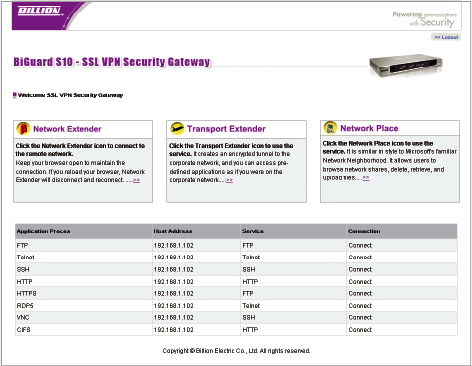
With the BiGuard SSL VPN Security Appliance series IT administrators can easily configure the gateway to control the resources and applications available to different groups of users. In addition, access policy, authorization, and authentication mechanisms can be set up as well. All this can be done through the easy-to-manage Personal Web Portal, which displays the applications by different groups of users.
Scalability and Resilience
Dual integrated WAN ports for two broadband lines ensure optimal bandwidth sharing for multiple PCs in your office, or provide network redundancy in case one connection should fail. The load balancing feature is designed to provide the ability to balance the workload by distributing outgoing traffic across the two connections, and meet growing business needs requiring more bandwidth, network scalability and resilience for mission-critical or Internet-business applications. The Auto fail-over feature can be configured for a second connection to assure redundant connectivity when the primary line fails.
Flexible Platform
Both SSL VPN and IPSec VPN are well-known remote access solutions. They are not competing, but complementary technologies. Both the BiGuard S10 and BiGuard S20 offer IPSec VPN and SSL VPN capabilities together on a single platform. This combination provides excellent deployment flexibility to small business operations for meeting the requirements of any remote access users. The need for, and additional cost of, deploying separate, extra platforms for both SSL and IPSec VPN is eliminated.
Options for Growth and Management
A total SSL VPN solution is made possible through optional support: SSL VPN Tunnel Upgrades, BiGuard’s Central Management System, and BiGuard One-Time Password. In case of a growing need for remote access, just upgrade the BiGuard SSL VPN gateway by adding more SSL VPN tunnels. To enforce management policy, administrators in the head office or service providers can deploy BiGuard Central Management System series, which enables remote configuration from a central site to save on maintenance. In addition, the BiGuard OTP, a car-key sized dongle, is used to create a two-factor authentication by using a dynamically generated 6-digit PIN. Combined with your existing static password this results in a greatly reduced risk of unauthorized access to corporate network resources by intruders.
* Note:
1. Please refer to sslvpnbrowser.htm for updates of all supported browsers and OS platforms. Users are strongly recommended to register at www.biguard.com for updated firmware.
2.All the specifications are subject to change without prior notice.
Advanced SSL Applications
Network Extender Technology
Virtually extending your connection to the central office network allows you to access your office resources seamlessly from anywhere — as if you’d never left the office. You can remotely access office files and applications through your computer, desktop or laptop, as if you were using a computer in your corporate network. A sales person on a business trip who needs to know the product inventory can use the Network Extender technology in BiGuard SSL VPN series, to connect to the corporate network and access the stock database to check, instead of phoning back to head office and asking.
Transport Extender Technology
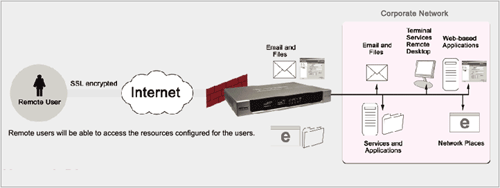
Enables specific remote users or specific remote groups of users to use the SSL VPN tunnel to connect to the corporate network to access the services as configured by IT administrators. Therefore the remote user does not have to change any specific settings in the web portal to make the service work. When a user remotely accesses MS Outlook e-mail, for instance, the Transport Extender technology will transport the e-mail service through the SSL VPN tunnel to the e-mail server in the corporate network, as configured by the IT administrator. Since the remote user doesn’t have to modify any settings in the web portal, the remote user will feel as if they’re using MS Outlook in the office.
My Network Places
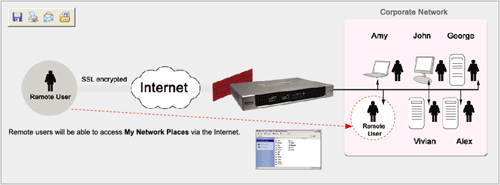
Just like the Windows Network Neighborhood, My Network Places allows users to browse network files on the office network. From a home computer or PDA, users can connect directly to My Network Places and access information inside the office — from now on there is no need to go back to the office if users forget an important document.
Application Proxy
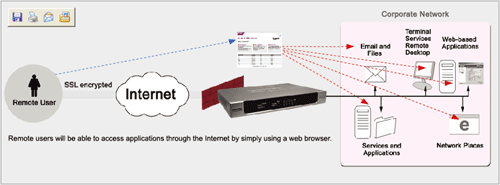
Supports most commonly used applications through a web-based interface. The great advantage of the application proxy is that there is no need to pre-install any client software for the applications users intend to download and share. The supported applications include:
• Remote desktop service such as Terminal Services (RDP5, RDP6), VNC
• HTTP- and HTTPS-based intranet data
• Remote control protocols: Telnet and SSH
• File Transfer Protocol (FTP)
• Network File sharing (CIFS)
• Citrix client
• Outlook Web Access (OWA)
Personalized Web Portal
• Easy Administration
Through the BiGuard SSL VPN series’ web management interface, grouping users and customizing applications becomes quick and easy. The web portal interface enables administrators to configure the BiGuard SSL VPN appliance series and authorize application access to users according to different authorization levels. The Quick Start Wizard provides administrators with a simple step-by-step guide to create, manage, and delete SSL VPN user accounts for remote users. The BiGuard SSL VPN series also provides administrators with user-friendly tools such as SSL VPN logs to monitor remote users’ access.
• Personalized Application Portal
Since the portal page is personalized for each individual, all the applications each individual is allowed to access are all shown via the web portal. A simply mouse click can start an application shown in the web portal. By using a standard web browser, remote users can access their personalized portal page.
Notes:
Some of the applications are available to Windows users only. The availability of applications and features stated varies according to browser and OS. Please click here for the details.
Features & Specifications
SSL VPN
Capabilities
BiGuard S5
• Ideal for small organizations to manage remote Intranet access and seek a solution with minimal IT investment
• 5 concurrent users, up to 20 user access BiGuard S10
• Ideal for small offices and SMBs with 50 to 200 employees
• 10 concurrent users, up to 20 user access BiGuard S20
• Ideal for small offices and SMBs with 50 to 200 employees
• 20 concurrent users
Access Connections
• Network Extender
• Standalone Network Extender client
• Transport Extender
• Application Proxy
• Personalized Web Portal
• Single Sign-On (SSO)
Applications & Management
• My Network Places (Web CIFS)
• SSL event log and monitor
• Citrix client
• Terminal services (RDP5, RDP6)
• File Transfer Protocol (FTP)
• Telnet
• Outlook Web Access (OWA)
• Virtual Network Computing (VNC)
• Secure Shell (SSH) support
• Web based data (HTTP, HTTPS)
• Granular User Policy Management
• Supports mobile devices
(Microsoft Windows Mobile 5.0/6.0 compatible)
Security
• SSL encryption
• Web cache cleaner
• Local Database
• Digital Certificate
• Self-Signed Certificate
• User Access Control
• Authentication Domains: RADIUS, LDAP, Active Directory, NT Domain
• Host Security Checking
Compatible Web Browsers* (Note)
• Microsoft Internet Explorer 6.0 and newer versions
• Netscape 7.0 and newer versions
• Opera 9.0 and newer versions
• Firefox 1.5 and newer versions
• Safari 2.0 and newer versions
• Mozilla 1.7 and newer versions
• Sun JRE 1.3 and newer versions
Quality of Service Control
• Supports DiffServ approach
• Traffic prioritization and bandwidth management based on IP protocol, port number and IP address
Web-based Management
• Easy-to-use web-based interface
• Firmware upgrade through web-based interface
• Local and remote management through HTTP and HTTPS
• Multi-language web interface
• Remote dial-in configuration (CLI for RS-232 port) (for BiGuard S20 only)
IPSec VPN (only for BiGuard S10 and BiGuard S20)
• BiGuard S10 - 10 IPSec VPN tunnels
• BiGuard S20 - 30 IPSec VPN tunnels
• Manual key, Internet Key Exchange (IKE) authentication and Key Management
• Authentication (MD5 / SHA-1)
• DES/3DES encryption
• AES 128/192/256 encryption
• IP Authentication Header (AH)
• IP Encapsulating Security Payload (ESP)
• Dynamic VPN (FQDN) support
• Supports remote access and office-to-office IPSec connections
Availability and Resilience (only for BiGuard S20)
• Load balancing - Traffic Management - Protocol binding
• Auto fail-over and VPN fail-over
Logging and Monitoring
• Centralized logs
• System log
• E-mail alerts and Intrusion logs
• System status monitoring
Network Protocols and Features
• Static IP, PPPoE and DHCP client connection to ISP
• NAT, static routing and RIP1/2
• Dynamic Domain Name System (DDNS)
• Router Mode
• Virtual Server
• Hardware DMZ
• DHCP Server
• SNTP
• SNMP
• Multi-NAT (for BiGuard S20 only)
• Transparent Bridging
Hardware Specifications
Physical Interface
BiGuard S5 • 1 x 10/100Mbps WAN port • 4 x 10/100Mbps LAN ports (1 port configurable as DMZ) • Power switch • Reset button BiGuard S10 • 1 x 10/100Mbps WAN port • 4 x 10/100Mbps LAN ports (1 port configurable as DMZ) • Power switch • Reset button BiGuard S20 • 2 x 10/100Mbps WAN ports • 8 x 10/100Mbps LAN ports (1 port can be configured as DMZ) • 1x 10/100/1000Mbps Gigabit port • 1x RS232 Serial port • Power switch • Reset button
Physical Specifications
BiGuard S5
• Dimensions: 19" x 6.93" x 1.65" (482 x 176 x 42mm with bracket) (250 x 176 x 33.5mm without bracket) BiGuard S10
• Dimensions: 19" x 6.93" x 1.65" (482 x 176 x 42mm with bracket) (250 x 176 x 35mm without bracket) BiGuard S20
• 1U rack-mount
Dimensions: 15.35" x 7.44" x 1.73" (482 x 210 x 44mm with bracket) (390 x 210 x 44mm without bracket)
Power Requirements
BiGuard S5 • Input: 12V DC, 1A BiGuard S10 • Input: 12V DC, 1A BiGuard S20 • Power Supply: 100 to 240V AC / 50 to 60Hz
Operating Environment
• Operating temperature: 0 to 40°c
• Storage temperature: -20 to 70°c
• Humidity: 20 to 95% non-condensing
* Note:
1. Please refer to the SSL VPN Browser pagefor updates of all supported browsers and OS platforms. Users are strongly recommended to register at www.biguard.com for updated firmware.
2.All the specifications are subject to change without prior notice.














 Key Features
 Network Extender Technology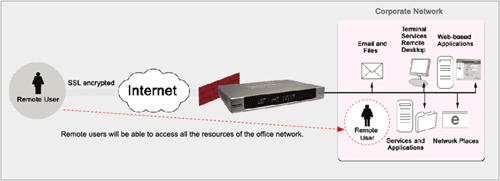
 - Traffic Management